Showing posts with label widget. Show all posts

Display Mobile Widget Template Tip

Create the widget in the template display the mobile version is actually quite easy by simply adding a mobile property on <b:widget> widget tag. There are 3 input value on these mobile property that has meaning and purpose of each. Here's the explanation:
mobile = 'yes': means the widget will be displayed on the mobile version of the template / mobile and desktop.
mobile = 'no': means the widget will only show the template versions of desktop / web.
mobile = 'only': means the widget will only show up on the mobile version of the template / mobile.


Well after understanding the above, we have now entered the implementation method. The first step we first determine which widget you want displayed on the mobile template. My advice should simply select the two important ones such as widget widget Recent Articles and Popular Post. Suppose I want to display the widget Recent Articles and Most HOT Week on mobile template, then the way is as follows:
1. Login to blogger dashboard, then go to menu Template> Edit HTML
2. In my template, the second code is the last widget like this:

<b:widget id='HTML12' locked='false' title='Artikel Terbaru' type='HTML'>
<b:includable id='main'>
and so on ...
</b:widget>

<b:widget id='PopularPosts1' locked='false' title='This Sunday at HOT' type='PopularPosts'>
<b:includable id='main'>
and so on...
</b:widget>
3. Add property mobile = 'yes' on each widget tag so that a complete code as shown below:
<b:widget id='HTML12' mobile='yes' locked='false' title='latest article' type='HTML'>
<b:includable id='main'>
and so on ...
</ b: widget>

<b:widget id='PopularPosts1' mobile='yes' locked='false' title='This Sunday at HOT' type='PopularPosts'>
<b:includable id='main'>
and so on ...
</ b: widget>
4. Save / save your template and you're done.Create the widget in the template display the mobile version is actually quite easy by simply adding a mobile property on <b:widget> widget tag. There are 3 input value on these mobile property that has meaning and purpose of each. Here's the explanation:
mobile = 'yes': means the widget will be displayed on the mobile version of the template / mobile and desktop.
mobile = 'no': means the widget will only show the template versions of desktop / web.
mobile = 'only': means the widget will only show up on the mobile version of the template / mobile.


Well after understanding the above, we have now entered the implementation method. The first step we first determine which widgets you want displayed on the mobile template. My advice should simply select the two important ones such as widget widget Recent Articles and Popular Post. Suppose I want to display the widget Recent Articles and Most HOT Week on mobile template, then the way is as follows:
1. Login to blogger dashboard, then go to menu Template> Edit HTML.
2. In my template, the second code is the last widget like this:

<b:widget id='HTML12' locked='false' title='Artikel Terbaru' type='HTML'>
<b:includable id='main'>
and so on ...
</b:widget>

<b:widget id='PopularPosts1' locked='false' title='This Sunday at HOT' type='PopularPosts'>
<b:includable id='main'>
and so on...
</b:widget>
3. Add property mobile = 'yes' on each widget tag so that a complete code as shown below:
<b:widget id='HTML12' mobile='yes' locked='false' title='latest article' type='HTML'>
<b:includable id='main'>
and so on ...
</ b: widget>

<b:widget id='PopularPosts1' mobile='yes' locked='false' title='This Sunday at HOT' type='PopularPosts'>
<b:includable id='main'>
and so on ...
</ b: widget>
4. Save / save your template and you're done.
Noted : I Use this for hiding my pagelist for only show in mobile browser mode, because my dropdown menu i created before more efective to show only in not mobile browser mode.
READ MORE - Display Mobile Widget Template Tip

Most Power Widget (Mashable)

Widgets are a handy, easy and simple way to add some flare to your blog. Whether you’d like to display the number of currently online visitors to your site or simply the weather report for Los Angeles, you can do it with widgets. We’ve assembled a list of 50 useful or simply cool widgets for your pleasure. And remember, the first rule of widgetizing your blog is – don’t overdo it!

MyBlogLog’s Recent Readers – this widget can easily be called a hit amongst blog owners; its popularity even managed to convince Yahoo into buying MyBlogLog. The widget lets you see the avatars of recent visitors to your blog, provided they’re also members of MyBlogLog.

Mashable – get the latest social networking news from this very site.

Flickr Flash Photo Stream Badge – display images from your Flickr profile with a handy Flash photo stream.

Preview Anywhere – see a live preview of outgoing links in a small popup which activates on mouseover. Some find this annoying, while others might find it useful.

Twitter Badge – if your life is so interesting that everyone must know what you’re up to all the time, then a Twitter badge is the ideal counterpart to your blog. It’ll proudly displays your recent tweets.

Digg News – display the latest Digg links on your blog. Themeable and fully customizable.

FEEDJIT – real time traffic data directly in your blog’s sidebar.

LineBuzz – inline comments for your blog. Very handy for blogs with frequent lively discussions.

Flixn – display a stream directly from your webcam, so your blog visitors can always see what you’re up to.

    Flixn

3Jam – lets your visitors send messages to your mobile phone, without them knowing your phone number.

Jaxtr – with Jaxtr, your visitors can actually call you to your mobile phone; again, your number stays private.

LinkedInABox – show off your LinkedIn profile. Perfect for personal blogs.

Box Widget – enable visitors to use box.net’s online storage directly on your web site.

Price of gas – displaying gas prices on your blog might seem unnecessary to some, but it’s cool if you have a traffic/travel related blog.

iBegin Weather Widget – Display weather information in your sidebar. Just like with Price of Gas, works great with travel-related blogs.

ClockLink – display time in various time zones with these nifty Flash clocks.

Film Loops – display the latest loops from your FilmLoops account.

Daily Painters – display paintings from famous painters on your blog.

WhoLinked – show your visitors which sites have recently linked to your web site. Works with all major blog platforms.

Criteo AutoRoll – displays links to blogs similar to your blog.

Bitty Browser – embed a cute, fully functional mini web browser to your blog.

Leafletter – create a mini website and embed it into your blog.

    Leafletter

WikiSeek – search Wikipedia with this simple widget.

FeedCount – show off the number of visitors to your blog with this handy little button.

Technorati Link Count – display the number of links your website has from one of the biggest blog authorities – Technorati.

MyPageRank – another good way to show how “big” your blog is is to show off your Google PageRank.

CheckPageRank – in addition to showing your PageRank, this widget also shows your Alexa ranking.

BlinkxIt – embed a link to related videos directly into your website.

Skype button – display your Skype online/offline status on your blog.

RockYou Horoscope – not something I would personally use, but some people are into horoscope. Hell, most people are into horoscope. Anyway, this widget shows horoscope (doh!) and does it in a nicely designed colorful box.

    Horoscope

del.icio.us Tagometer – display how many times have del.icio.us users saved your page.

del.icio.us Linkrolls – this badge shows your latest bookmarks from del.icio.us.

Timelines – need to create a timeline? Seek no further. This widget makes it really easy.

PollDaddy – PollDaddy lets you create beautiful polls in no time, and display them at your blog.

Vizu – another poll-making widget, compatible with all major blog platforms.

AnswerTips – display definitions from Answers.com for various terms on your blog. The definitions are shown in bubbles which are activated on doubleclick.

AnswerBoxes – give your visitors a chance to enter a term themselves, and get a definition from Answers.com

Now Playing – if you got to share your current playlist contents with the world, Sigamp will do the trick. Works with most popular music players, including Foobar, Winamp, iTunes and others.

BuzzBoost – display headlines from your RSS feed on any website.

LibraryThing – show off the latest books you’ve been reading.

Plaxo Address Book – let your most faithful visitors access their address books direclty from your site.

    Plaxo

AuctionAds – a widget that displays auctioned items on eBay, and gives you a percentage of the price paid when sometimes buys an item.

aStore – similar to AuctionAds, only for Amazon. Create a mini-store on your site and receive profit when someone buys an item through your store.

Plazes – show your current location on a Plazes map.

Stockalicious – track your portfolio with this widget, and share it with others. Let everyone know how much money you’ve lost.

Yahoo! For Good – create a charity badge and ask for donations for a worthy cause.

Giftspace – your friends never know what to buy you for birthday? Let them know what you really want with this nifty widget.

MixMap – see where are the visitors to your MySpace profile from on a map.

    MixMap

Google Map Widget – display a searchable Google Map on your website.

Google Video Search – add a video search form and selected videos to your web site.

Odeo player – display an Odeo player for and podcast right there in your sidebar.

READ MORE - Most Power Widget (Mashable)

Comments Wall Gadget for Sidebar

Comments in Blogger are made under and on posts. The Main Page has a Comments link under each post for the viewer to click and post his/her comments. There is no facility to put in a general comment on anything under the sun! 

The Friend Connect Gadget provided a Comment Wall which you could put in the sidebar for inviting general comments. The Followers gadget is being upgraded to the Friend Connect gadget and hence it is now not possible to add the latter gadget in the usual manner. If you have Custom Domains then only you can add the Friend Connect gadget in the usual manner.

Here is a workaround to add the Comments Wall in the sidebar to a blogspot.com blog......................

1. INSTALL FOLLOWERS GADGET

If you do not have a Followers gadget in the blog the first step is to install it in the usual manner for adding gadgets to the blog. Login at Blogger.com and click Layout lik for your blog on Dashboard. On Page Elements subtab click Add Gadget link and in popup window click on Followers gadget. New blogs have this gadget by default.

2. GET SITE NUMBER FOR BLOG.

The next step is to get the site number for your blog. To get it Login at Blogger.com and click on View Blog link on Dashboard for blog. Blog will open in browser. Go to View---->Page Source from browser menu. In Page Source do a Ctrl+F (Edit--->Find) for 'site' in the Followers gadget. It will appear like this :

......
......
google.friendconnect.container.renderMembersGadget(
{ id: "div-1238464215135",
site: "BIG_NUMBER" },
skin);
</script>

Copy down the 'BIG_NUMBER' in the page source.

COMMENTS WALL CODE

In this step copy the code for the comment wall gadget given below :

<!-- Include the Google Friend Connect javascript library. -->
<script type="text/javascript" src="http://www.google.com/friendconnect/script/friendconnect.js"></script>
<!-- Define the div tag where the gadget will be inserted. -->
<div id="div-comment-wall" style="width:210px;border:1px solid #cccccc;"></div>
<!-- Render the gadget into a div. -->
<script type="text/javascript">
var skin = {};
skin['BORDER_COLOR'] = '#cccccc';
skin['ENDCAP_BG_COLOR'] = '#e0ecff';
skin['ENDCAP_TEXT_COLOR'] = '#333333';
skin['ENDCAP_LINK_COLOR'] = '#0000cc';
skin['ALTERNATE_BG_COLOR'] = '#ffffff';
skin['CONTENT_BG_COLOR'] = '#ffffff';
skin['CONTENT_LINK_COLOR'] = '#0000cc';
skin['CONTENT_TEXT_COLOR'] = '#333333';
skin['CONTENT_SECONDARY_LINK_COLOR'] = '#7777cc';
skin['CONTENT_SECONDARY_TEXT_COLOR'] = '#666666';
skin['CONTENT_HEADLINE_COLOR'] = '#333333';
skin['DEFAULT_COMMENT_TEXT'] = '- add your comment here -';
skin['HEADER_TEXT'] = 'Comments';
skin['POSTS_PER_PAGE'] = '5';
google.friendconnect.container.setParentUrl('/' /* location of rpc_relay.html and canvas.html */);
google.friendconnect.container.renderWallGadget(
{ id: 'div-comment-wall',
site: 'BIG_NUMBER',
'view-params':{"disableMinMax":"true","scope":"SITE","allowAnonymousPost":"true","features":"video,comment","startMaximized":"true"}
},
skin);
</script>

Put the site number from step 2 instead of 'BIG_NUMBER' in the code above. To customize it further change :

div id="div-comment-wall" style="width:210px;border:1px solid #cccccc;"></div>

width(210) in above code and border size(1px) and border color(cccccc). Change the colors by changing the hex numbers at the end of these lines :

skin['BORDER_COLOR'] = '#cccccc';
skin['ENDCAP_BG_COLOR'] = '#e0ecff';
skin['ENDCAP_TEXT_COLOR'] = '#333333';
skin['ENDCAP_LINK_COLOR'] = '#0000cc';
skin['ALTERNATE_BG_COLOR'] = '#ffffff';
skin['CONTENT_BG_COLOR'] = '#ffffff';
skin['CONTENT_LINK_COLOR'] = '#0000cc';
skin['CONTENT_TEXT_COLOR'] = '#333333';
skin['CONTENT_SECONDARY_LINK_COLOR'] = '#7777cc';
skin['CONTENT_SECONDARY_TEXT_COLOR'] = '#666666';
skin['CONTENT_HEADLINE_COLOR'] = '#333333';

You can get hex color numbers here.

To change number of comments shown change '5' (any number from 1 to 15) in this line :

skin['POSTS_PER_PAGE'] = '5';

To prevent spam delete :

"allowAnonymousPost":"true",

PASTE CODE IN HTML GADGET

Lastly copy the modified code and paste in a HTML gadget in sidebar. Login at Blogger.com and click Layout lik for your blog on Dashboard. On Page Elements subtab click Add Gadget link and in popup window click on HTML/Javascript gadget. In contents window paste the modified code and save. Here is what it looks like :


READ MORE - Comments Wall Gadget for Sidebar

Mashable Like Floating Social Bookmarking Widget For Blogge

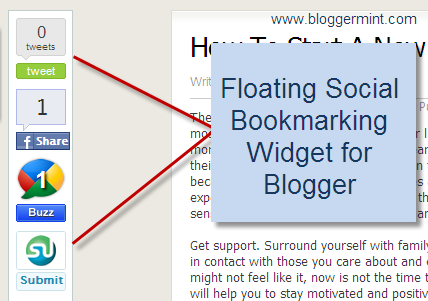
Its been a while many got impressed with Mashable’s floating social bookmarking widget and many tried and came up with a wordpress plugin. But actually people forgot about creating a floating social bookmarking plugin for blogger. So here in this post, I am going to teach how to add floating social widget to your blogger/blogspot blogs.

Floating Social Bookmarking Widget for Blogger

Live Demo

Step 1: Navigate to Edit HTML from Blogger dashboard and check Edit Widget Template. Search for ]]></b:skin> and replace it with the below code

01#sharebox {
02background-color:#FFFFFF;
03border-color:#C1CDCD;
04border-style:solid;
05border-width:1px;
06left:103px;
07bottom:40px;
08margin-top:10px;
09position:fixed;
10width:64px;
11}
12 
13#sharebox .float {margin:7px}
14.FBConnectButton_Text
15{
16font-size8px;
17padding:2px 4px 3px !important;
18}
19]]></b:skin>

Step 2: This step involves inserting the widget functions into your template. Therefore, place the below code before <div class=’post-header-line-1′/>

01<b:if cond='data:blog.pageType == &quot;item&quot;'>
02<div id='sharebox'>
03<div class='float'><scriptsrc='http://tweetmeme.com/i/scripts/button.js'type='text/javascript'/></div>
04<div class='float'><a href='http://www.facebook.com/sharer.php'name='fb_share' type='box_count'>Share</a><scriptsrc='http://static.ak.fbcdn.net/connect.php/js/FB.Share'type='text/javascript'/><div class='clear'/></div>
05<div class='float'><a class='google-buzz-button' data-button-style='normal-count' href='http://www.google.com/buzz/post'title='Post on Google Buzz'/>
06<script src='http://www.google.com/buzz/api/button.js'type='text/javascript'/></div>
07<div class='float'><scriptsrc='http://www.stumbleupon.com/hostedbadge.php?s=5'/></div>
08</div>
09<a href='http://www.bloggermint.com/2010/06/mashable-like-floating-social-bookmarking-widget-for-blogger/'><fontsize='0.3'>Bloggermint</font></a>
10</b:if>

Thats it and remember, the floating widget is visible only for blog post, so this widget won’t be visible on your blog homepage

READ MORE - Mashable Like Floating Social Bookmarking Widget For Blogge