Showing posts with label tools. Show all posts

Firefox add-ons to make you a better blogger

Blogging always needs things that makes it more easier and far interesting than what it normally is. You need to do things that can make you call yourself a geek and not just a blogger. Web browsers are one of those aspects that one concentrates on, while they are blogging.

Firefox is the best browser for blogging in wordpress blogs, due to the availability of the add-ons which make the stuff more easier. To become a better blogger, here are a few firefox add-ons that would make things easier to do on your blog -

Scribefire Blog Editor – (Add-on Page)

One of the best blog editors around, that has some awesome features and integrates into the browser for posting easily into the blog. It has many options like the drag & drop, formatting the text, taking notes, uploading images and even posting into multiple blogs.

Even from the same area, you can share the posted page to various social bookmarking and networking sites like Mahalo, Propeller, Reddit, Facebook, Digg, Ma.gnolia, Fark, Stumbleupon, Newsvine etc. The add-on helps us post to various blogging platforms like Blogger, WordPress, Tumblr, Metaweblog, MovableType, Posterous.

scribefire chrome new blog Firefox add ons to make you a better blogger


Zemanta – (Add-on Page)

This add-on enhances the blogging admin panel and the mail compose section, by suggesting recommendations to a topic that you are writing. Zemanta supports WordPress, Blogger, TypePad, Movable Type, Drupal, Tumblr and email platforms Google Mail and Yahoo!Mail. The topics are searched in some of the biggest resources like Wikipedia, IMDB, Crunchbase, Google maps, Amazon etc.

zemanta Firefox add ons to make you a better blogger

Pearltrees – (Add-on Page)

It is the social way to organize, discover and share the stuff you like on the web. A pearl is like a bookmark, and it holds something that you like on the web. There are pearltrees which work like the folders for pearls, and you can organize the pearls and move them into the pearltrees. Pick the pearltrees you are most interested in and follow their activity.

pearltrees Firefox add ons to make you a better blogger

Shareaholic – (Add-on Page)

This add-on helps in sharing links from within the browser, from any webpage into various social bookmarking and social networking sites. The sites include Facebook, Twitter, Gmail, Evernote, Delicious, Digg. The add-on is optimized such that it doesn’t slow down the firefox browser. A single click lets us to reach the most frequently used URL shorteners, and you don’t need to bookmark all the sites where you share. It supports more than 100 services.

shareaholic Firefox add ons to make you a better blogger

FireFTP – (Add-on Page)

FireFTP is a free, secure, cross-platform FTP/SFTP client for Mozilla Firefox which provides easy and intuitive access to FTP/SFTP servers. Along with transferring your files quickly and efficiently, FireFTP also includes more advanced features such as: directory comparison, syncing directories while navigating, SFTP, SSL encryption, search/filtering, integrity checks, remote editing, drag & drop, file hashing, and much more.

fireftp Firefox add ons to make you a better blogger

There are several other firefox add-ons that provide the job of blog editing but Scribefire is the best of all, and there are a few tools like Screengrab that also helps bloggers with many other things.

READ MORE - Firefox add-ons to make you a better blogger

Most Power Widget (Mashable)

Widgets are a handy, easy and simple way to add some flare to your blog. Whether you’d like to display the number of currently online visitors to your site or simply the weather report for Los Angeles, you can do it with widgets. We’ve assembled a list of 50 useful or simply cool widgets for your pleasure. And remember, the first rule of widgetizing your blog is – don’t overdo it!

MyBlogLog’s Recent Readers – this widget can easily be called a hit amongst blog owners; its popularity even managed to convince Yahoo into buying MyBlogLog. The widget lets you see the avatars of recent visitors to your blog, provided they’re also members of MyBlogLog.

Mashable – get the latest social networking news from this very site.

Flickr Flash Photo Stream Badge – display images from your Flickr profile with a handy Flash photo stream.

Preview Anywhere – see a live preview of outgoing links in a small popup which activates on mouseover. Some find this annoying, while others might find it useful.

Twitter Badge – if your life is so interesting that everyone must know what you’re up to all the time, then a Twitter badge is the ideal counterpart to your blog. It’ll proudly displays your recent tweets.

Digg News – display the latest Digg links on your blog. Themeable and fully customizable.

FEEDJIT – real time traffic data directly in your blog’s sidebar.

LineBuzz – inline comments for your blog. Very handy for blogs with frequent lively discussions.

Flixn – display a stream directly from your webcam, so your blog visitors can always see what you’re up to.

    Flixn

3Jam – lets your visitors send messages to your mobile phone, without them knowing your phone number.

Jaxtr – with Jaxtr, your visitors can actually call you to your mobile phone; again, your number stays private.

LinkedInABox – show off your LinkedIn profile. Perfect for personal blogs.

Box Widget – enable visitors to use box.net’s online storage directly on your web site.

Price of gas – displaying gas prices on your blog might seem unnecessary to some, but it’s cool if you have a traffic/travel related blog.

iBegin Weather Widget – Display weather information in your sidebar. Just like with Price of Gas, works great with travel-related blogs.

ClockLink – display time in various time zones with these nifty Flash clocks.

Film Loops – display the latest loops from your FilmLoops account.

Daily Painters – display paintings from famous painters on your blog.

WhoLinked – show your visitors which sites have recently linked to your web site. Works with all major blog platforms.

Criteo AutoRoll – displays links to blogs similar to your blog.

Bitty Browser – embed a cute, fully functional mini web browser to your blog.

Leafletter – create a mini website and embed it into your blog.

    Leafletter

WikiSeek – search Wikipedia with this simple widget.

FeedCount – show off the number of visitors to your blog with this handy little button.

Technorati Link Count – display the number of links your website has from one of the biggest blog authorities – Technorati.

MyPageRank – another good way to show how “big” your blog is is to show off your Google PageRank.

CheckPageRank – in addition to showing your PageRank, this widget also shows your Alexa ranking.

BlinkxIt – embed a link to related videos directly into your website.

Skype button – display your Skype online/offline status on your blog.

RockYou Horoscope – not something I would personally use, but some people are into horoscope. Hell, most people are into horoscope. Anyway, this widget shows horoscope (doh!) and does it in a nicely designed colorful box.

    Horoscope

del.icio.us Tagometer – display how many times have del.icio.us users saved your page.

del.icio.us Linkrolls – this badge shows your latest bookmarks from del.icio.us.

Timelines – need to create a timeline? Seek no further. This widget makes it really easy.

PollDaddy – PollDaddy lets you create beautiful polls in no time, and display them at your blog.

Vizu – another poll-making widget, compatible with all major blog platforms.

AnswerTips – display definitions from Answers.com for various terms on your blog. The definitions are shown in bubbles which are activated on doubleclick.

AnswerBoxes – give your visitors a chance to enter a term themselves, and get a definition from Answers.com

Now Playing – if you got to share your current playlist contents with the world, Sigamp will do the trick. Works with most popular music players, including Foobar, Winamp, iTunes and others.

BuzzBoost – display headlines from your RSS feed on any website.

LibraryThing – show off the latest books you’ve been reading.

Plaxo Address Book – let your most faithful visitors access their address books direclty from your site.

    Plaxo

AuctionAds – a widget that displays auctioned items on eBay, and gives you a percentage of the price paid when sometimes buys an item.

aStore – similar to AuctionAds, only for Amazon. Create a mini-store on your site and receive profit when someone buys an item through your store.

Plazes – show your current location on a Plazes map.

Stockalicious – track your portfolio with this widget, and share it with others. Let everyone know how much money you’ve lost.

Yahoo! For Good – create a charity badge and ask for donations for a worthy cause.

Giftspace – your friends never know what to buy you for birthday? Let them know what you really want with this nifty widget.

MixMap – see where are the visitors to your MySpace profile from on a map.

    MixMap

Google Map Widget – display a searchable Google Map on your website.

Google Video Search – add a video search form and selected videos to your web site.

Odeo player – display an Odeo player for and podcast right there in your sidebar.

READ MORE - Most Power Widget (Mashable)

Author Information Widget for Blogger

We all had seen author info widget below each post on Wordpress blogs, but actually its not much seen in Blogger. Basically Blogger is not a platform for beginners, its a kinda platform to blog. There are endless possibilities to makes your Blogger blog look like a Wordpress blog. So to make that note true, today I am going to teach you how to add author info widget, below every blog post.

Updated script with author image inside the widget

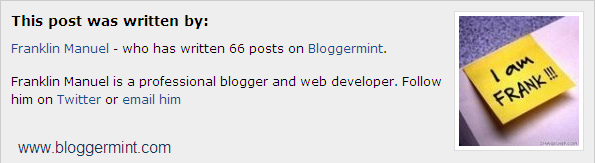
author info widget for blogger

Step 1: Login to your Blogger dashboard and navigate to Layout > Edit HTML and check the box of expand widget templates. Now search for the code ]]></b:skin> once you find it, replace the code with the below code

01.author_info {
02    floatleft;
03    width573px;
04    padding10px;
05    border1px solid #ccc;
06    margin-bottom15px;
07    margin-top15px;
08    background#eee;
09}
10.author_info h3 {
11    margin-bottom10px;
12}
13.author_photo {
14    floatright;
15    margin0 0 0 10px;
16}
17.author_photo img {
18    border1px solid #666;
19}
20]]></b:skin>

Step 2: Now we are going to add the div part of the author info widget. To do that search for the code <div class=’post-footer-line post-footer-line-1′>and paste the below code after <div class=’post-footer-line post-footer-line-1′>

01<b:if cond='data:blog.pageType == &quot;item&quot;'>
02<div class='author_info'>
03<div class='author_photo'>
04<img alt='author' src='http://i50.tinypic.com/iw7lec.jpg'/></div>
05                    <h3>This post was written by:</h3>                 
06 
07                                        <p><a href='http://franklin.bloggermint.com' title='Posts by Franklin'>Franklin Manuel</a> - who has written 66 posts on <a href='http://bloggermint.com/'>Bloggermint</a>.</p>
08 
09                    <p>Franklin Manuel is a professional blogger and web developer. Follow him on <a href='http://twitter.com/bloggermint'>Twitter</a> or <a href='mailto:bloggermint@gmail.com'>email him</a><br style='clear:both;'/></p>
10                   </div>
11 
12</b:if>

Edit your information according to your needs and you all set done, check your blog to see the changes.

READ MORE - Author Information Widget for Blogger