Showing posts with label template. Show all posts

Mudah Membuat Breadcrumbs untuk SEO

Breadcrumb adalah sebuah navigasi menu horizontal pada sebuah blog yang biasanya berada pada posisi atas blog di bawah judul atau header blog dan berfungsi mempermudah bagi pengunjung untuk mengetahui sedang berada di halaman mana berada dan memudahkan ketika akan kembali ke menu sebelumnya.


Anda dapat melihatnya pada contoh pada blog ini atau lihat pada picture bawah ini


Membuat breadcrumb pada sebuah blog sepertinya sesuatu yang wajib diadakan, kenapa? karena selain dari fungsi di atas, sama halnya seperti sitemap, breadcrumb juga sangat baik bagi SEO blog karena akan memperkaya kata kunci dalam postingan.
 
Bagi anda yang memakai template bawaan blogger breadcrumb ini tidak disediakan dan anda harus menginstalnya sendiri. Tetapi untuk template-template gratisan dari penyedia template yang banyak beredar terkadang fungsi breadcrumb ini sudah terpasang otomatis. 


Nah sekarang bagaimana cara membuat breadcrumb pada blogspot? Gampang sekali kok ^_^, caranya adalah:
1.      Log in ke blogger
2.      Masuk ke rancangan >  Edit HTML > centang “Expand Template Widget”
3.      Untuk amannya adan download dulu templatenya sebagai antisipasi apabila ada kesalahan.
4.      Dengan CTRL F cara kode ]]></b:skin>
5.      Copy kode dibawah ini dan paste tepat diatas kode  ]]></b:skin>

.breadcrumbs{
padding-left:10px;font-size:95%;
line-height:1.4em;
border-bottom:4px double #cadaef;
}

6.   Kemudian copy kode dibawah ini dan paste tepat dibawah kode <div class='post hentry'> atau cari kode ini <b:includable id='post' var='post'> Paste kode dibawah tepat dibawahnya.

<b:if cond='data:blog.homepageUrl == data:blog.url'>
<b:else/>
<b:if cond='data:blog.pageType == &quot;item&quot;'>
<div class='breadcrumbs'>
Anda disini &#187; <a expr:href='data:blog.homepageUrl'>Home</a> &#187;
<b:if cond='data:post.labels'><b:loop values='data:post.labels' var='label'>
<a expr:href='data:label.url' rel='tag'><data:label.name/></a>
<b:if cond='data:label.isLast != &quot;true&quot;'> , </b:if>
</b:loop>
</b:if> &#187; <data:post.title/>
</div>
</b:if>
</b:if>

7.    Selesai. Simpan dan lihat hasilnya dengan mengklik salah satu postingan.


READ MORE - Mudah Membuat Breadcrumbs untuk SEO

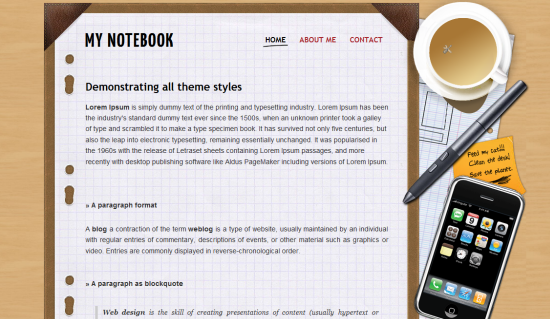
My Notebook Template

After a series of CSS based template, this time we have shift our focus to make a Blogger template that focus on design art. The original design of this template belongs toFreePSDfiles and we actually ported it, altered to make it work for the blogger platform. We love the template and hope you guys too love it.

If you guys want a custom Blogger or WordPress theme contact us. We are one of the best team who excel in blogger and WordPress themes.

my notebook blogger template

Template specifications:

  • Two column
  • Page navigation widget
  • Author widget
  • Compatible with all browsers

Do let us know, what you think about this template. Your suggestions will help us grow better.

READ MORE - My Notebook Template

Free Premium Business Template For Blogger

In this article I have listed below premium quality free blogger templates collection for business purposes.All of the templates listed here have premium look and features like Horizontal Navigation Menus,Auto Read More Feature with Thumbnails, Header Ads banner, Search Box, Featured content sliders,Favicon support, Numbered Page Navigation Hack Installed and more...

You can download all of these blogger templates for free.These free Blogger templates are licensed under the Creative Commons Attribution 3.0 License,which permits both personal and commercial use.However, to satisfy the 'attribution' clause of the license, you are required to keep the footer links intact which provides due credit to its authors. For more specific details about the license, you may visit the URL below:
http://creativecommons.org/licenses/by/3.0/


1. Business Company

Business Company Blogger TemplateProperties : 1 Sidebar, 2 Column, Adapted from Wordpress, Elegant, Featured Section, Fixed width, Header Banner, Magazine, Business, Right Sidebar, Rounded corners, Top Navigation Bar, Web 2.0, White

Demo Download & Info


2. Incorporate

Incorporate Blogger TemplateProperties : 1 Sidebar, 2 Column, Adapted from Wordpress, Elegant, Featured Section, Fixed width, Magazine, Premium, Right Sidebar, Rounded corners, Slider, Tabbed widget, Top Navigation Bar, Web 2.0, White

Demo Download & Info


3. Business Style

Business Style Blogger TemplateProperties : 1 Sidebar, 2 Column, Adapted from Wordpress, Elegant, Featured Section, Fixed width, Green, Magazine, Right Sidebar, Premium, Rounded corners, Slider, Tabbed widget, Top Navigation Bar, Web 2.0, White

Demo Download & Info


4. Dominate

Dominate Blogger TemplateProperties : 1 Sidebar, 2 Column, Adapted from Wordpress, Elegant, Featured Section, Fixed width, Grey, Header Banner, Magazine, Premium, Right Sidebar, Rounded corners, Slider, Top Navigation Bar, Web 2.0, White

Demo Download & Info


5. BusinessCorp

Business Corp Blogger TemplateProperties : 1 Sidebar, 2 Column, Adapted from Wordpress, Elegant, Featured Section, Fixed width, Gradients, Grey, Magazine, Right Sidebar, Orange, Top Navigation Bar, White

Demo Download & Info


6. Business View

Business View Blogger TemplateProperties : 1 Sidebar, 2 Column, Adapted from Wordpress, Brown, Elegant, Featured Section, Fixed width, Left Sidebar, Magazine, Rounded corners, Top Navigation Bar, White, Yellow

Demo Download & Info


7. Business Top

Business Top Blogger TemplateProperties : 1 Sidebar, 2 Column, Adapted from Wordpress, Black, Blue, Elegant, Featured Section, Fixed width, Magazine, Right Sidebar, Rounded corners, Slider, Top Navigation Bar, White

Demo Download & Info


8. iBusiness

iBusiness Blogger TemplateProperties : 1 Sidebar, 2 Column, Adapted from Wordpress, Elegant, Featured Section, Fixed width, Gradients, Grey, Magazine, Right Sidebar, Rounded corners, Top Navigation Bar, White

Demo Download & Info



9. Company Style

Company Style Blogger TemplateProperties : 1 Sidebar, 2 Column, Adapted from Wordpress, Brown, Featured Section, Fixed width, Magazine, Orange, Right Sidebar, Rounded corners, Top Navigation Bar, White

Demo Download & Info


10. Company Style Blue

Company Style Blue Blogger TemplateProperties : 1 Sidebar, 2 Column, Adapted from Wordpress, Blue, Elegant, Featured Section, Fixed width, Gradients, Magazine, Right Sidebar, Rounded corners, Top Navigation Bar, Web 2.0, White

Demo Download & Info



11. Lion Press

Lion Press Blogger TemplateProperties : 2 Sidebar, 3 Column, Adapted from Wordpress, Featured Section, Fixed width, Gradients, Grey, Header Banner, Magazine, Red, Right Sidebar, Slider, Top Navigation Bar, White

Demo Download & Info


12. iFinance

iFinance Blogger TemplateProperties : 2 Sidebar, 3 Column, Adapted from Wordpress, Featured Section, Fixed width, Green, Header Banner, Magazine, Right Sidebar, Rounded corners, Slider, Top Navigation Bar, Web 2.0, White

Demo Download & Info


13. Glorius

Glorius Blogger TemplateProperties : 1 Sidebar, 2 Column, Adapted from Wordpress, Brown, Elegant, Featured Section, Fixed width, Gradients, Header Banner, Magazine, Right Sidebar, Slider, Top Navigation Bar, Web 2.0, White

Demo Download & Info
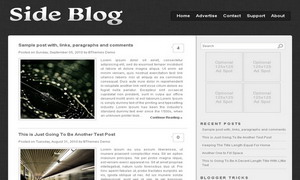


14. Side Blog

Side Blog Blogger TemplateProperties : 1 Sidebar, 2 Column, Adapted from Wordpress, Elegant, Fixed width, Fresh, Grey, Magazine, Premium, Right Sidebar, Rounded corners, Top Navigation Bar, Web 2.0, White

Demo Download & Info


15. Supras

Supras Blogger TemplateProperties : 2 Sidebar, 3 Column, Adapted from Wordpress, Blue, Elegant, Featured Section, Fixed width, Header Banner, Left Sidebar, Magazine, Blogger Pages Ready, Premium, Right Sidebar, Slider, Tabbed widget, Top Navigation Bar, Web 2.0, White

Demo Download & Info



16. BlueCorp

BlueCorp Blogger TemplateProperties : 1 Sidebar, 2 Column, Adapted from Wordpress, Blue, Elegant, Featured Section, Fixed width, Magazine, Business, Right Sidebar, Top Navigation Bar, White

Demo Download & Info


17. MyBusiness

MyBusiness Blogger TemplateProperties : 1 Sidebar, 2 Column, Adapted from Wordpress, Blue, Elegant, Featured Section, Fixed width, Magazine, Premium, Right Sidebar, Tabbed widget, Top Navigation Bar, Web 2.0, White

Demo Download & Info


READ MORE - Free Premium Business Template For Blogger

Blogger Template, Thesis Designer, From Hacktutors


View Demo


355
Times Downloaded

I've converted it into blogger template based on the theme of ShoutMeloud.

Features of Thesis Template:

It has stylish 2 columns, one is post body and second one is sidebar, where you can put many widgets and Ads. In the bottom of this template, there is 3 rows as well.


This template consists of Read More hack with automatic thumbnail to make the template more professional.


Readers can easily comment on any post by clicking Add your comment button which consists on Home Page. Also, you can view, how many comments consists in each posts.


It has 2 navigation bar on the top of the template where you can add the main link to your blogs post or categories.


On the bottom of the template there is 3 rows where you can place option widgets like About Me, Categories and so on.


It has the most demanded Blogger hack i.e. Page navigation on the bottom of each page.

Customizations

Top Menu Configuration

To customize Top Menu, find the following code in your template and place your own links.
<div id='nav'>
<ul id='secnav'>
  <li><a expr:href='data:blog.homepageUrl'>Home</a></li>
  <li><a href='http://hacktutors.info/2009/08/contact-me.html'>Contact Us</a>
    <ul class='children'>
    </ul>
  </li>
  <li><a href='http://www.hacktutors.info/p/our-in-touched-bloggers.html'>Bloggers</a></li>
  <li><a href='http://hacktutors.info/p/link-to-us.html'>Link to Us</a></li>
  <li><a href='http://hacktutors.info/search/label/Download'>Download</a>
    <ul class='children'>
      <li><a href='#'>Drop</a></li>
    </ul>
  </li>
  <li><a href='http://www.hacktutors.info/search/label/Page%20Rank'>Rank</a></li>
  <li><a href='#'>Join HackTutors</a>
    <ul class='children'>
      <li><a href='#'>Advertise</a></li>
    </ul>
  </li>
</ul>

Adsense Search Customization

To customize the search form on the top right side of the template, find the following code and replace it with your own adsense search code.

<div id='google-search'>
  <form action='http://www.shoutmeloud.com/search' id='cse-search-box'>
    <div>
      <input name='cx' type='hidden' value='partner-pub-6601904697443775:73g5y9j0de1'/>
      <input name='cof' type='hidden' value='FORID:10'/>
      <input name='ie' type='hidden' value='ISO-8859-1'/>
      <input name='q' size='30' type='text'/>
      <input name='sa' type='submit' value=''/>
    </div>
  </form>
  <script src='http://www.google.com/cse/brand?form=cse-search-box&amp;lang=en' type='text/javascript'/> </div>
Sub Navigation Bar

To customize sub navigation bar, search for the following code code and replace the link with your own.

<div id='categories'>
  <ul>
    <li><a href='http://hacktutors.info/search/label/Blogging'>Blogger tools</a> </li>
    <li><a href='http://www.hacktutors.info/search/label/Graphic'>Graphics</a>
      <ul class='children'>
        <li class='cat-item cat-item-149'><a href='#'>SEO</a> </li>
      </ul>
    </li>
    <li><a href='http://www.hacktutors.info/search/label/Web%20design'>Web Design</a>
      <ul class='children'>
        <li><a href='http://www.hacktutors.info/search/label/Social%20Media'>Social Media</a> </li>
      </ul>
    </li>
    <li><a href='http://www.hacktutors.info/search/label/Make%20money%20online'>Make Money Online</a> </li>
    <li><a href='http://www.hacktutors.info/search/label/Blogger%20Help'>Blogger Help</a> </li>
  </ul>
</div>
Header Logo and Banner

Search for the following code in your template to replace the logo. There is the 468X60px banner on the top right, you can customize that with your banner URL.

<div id='joelogo'>

<a href='http://www.hacktutors.info'><img class='logo' src='http://4.bp.blogspot.com/_b0xJ7qk6DTc/TGdrjNWW8cI/
AAAAAAAAA1Q/mZxvQIRDDO0/s1600/Thesislogo+copy.png
'/></a>

  <div id='joead2'>
<a href='http://www.hacktutors.info' target='_blank'><img border='0' src='http://3.bp.blogspot.com/_b0xJ7qk6DTc/TGdcVUncDfI/
AAAAAAAAA0o/T6te7Q6DjS8/s1600/Bigbanner.gif
'/></a>
 </div>
</div>


Placement of Google Ads below the Sub Navigation bar

You can get more ad clicks by placing the Google Ad Link Units below the sub navigation bar. To do like that, search for the following code and place your link unit code just below the following code.

<div id='joead3'>

Your ad code goes here.

</div>


Customizing Facebook Like Button

There is the small Facebook like button on the top right in each blog posts. To customize that, Search for the following code in your Template:

<div class='post-header-line-1'>

<div style='float:right;padding:4px;'>

<iframe allowTransparency='true' frameborder='0' scrolling='no' src='http://www.facebook.com/plugins/like.php?href=http%3A%2F%2Fwww.hacktutors.info&amp;layout=button_count&amp;
show_faces=false&amp;width=70&amp;action=like&amp;font=arial&
amp;colorscheme=light&amp;height=21' style='border:none; overflow:hidden; width:70px; height:21px;'/>


</div>


Replace above red codes with the following:

(Code Updated)


<iframe allowTransparency='true' expr:src='&quot;http://www.facebook.com/plugins/like.php?href=&quot; + data:post.url + &quot;&amp;layout=button_count&amp;show_faces=false&amp;
width=64&amp;action=like&amp;
font=arial&amp;colorscheme=light&quot;' frameborder='0' scrolling='no' style='border:none; overflow:hidden; width:64px; height:40px;'/>


Now, you are ready to use this template! Enjoy the new Thesis Blogger Template. If you have any problem regarding this template, you are free to ask me. You can suggest me any thing that you are thinking to do new in this template.
READ MORE - Blogger Template, Thesis Designer, From Hacktutors

Blogger Template, Platinum Theme from Hacktutors

Download Platinum Blogger Template

View Demo

Download Platinum Blogger Template

257 Times Downloaded

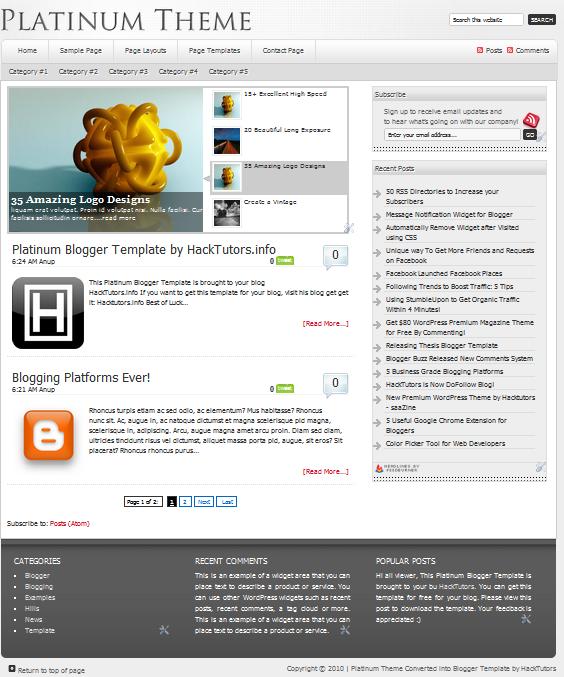
I converted Platinum WordPress theme into Blogger Template. Originally, Brian Gardner designed it and I converted it for all Blogger users and make it available for absolutely free.

Let see what I have added the cool feature on this template:

JQuery Drop Down Menu Bar


On the top of the page, it consists of awesome Drop down menu with JQuery effects. When you hover your mouse to these menus, it will drop soothly to downward direction.

JQuery Featured Post widget


With this widget, you can show the most featured post of your blog with image thumbnail and summary text. However, featured post widget is only visible on HomePage to make it look more professional.

Automatic Read More with Thumbnail


After you've written a post, you don't need to worry about the Jump links that blogger recently announced. Just you have to create a post a publish it! Your reader can easily view your post with attractive thumbnail on the left side and Ream More link on the right side.

Page Navigation


There was an error on the Blogger's default pager links. So, I installed Page Navigation hack for it to make it easy to turn the page of your blog easily.

There is many more missing that I cannot mention it here. In fact this template have more flexible where you can add more widgets on the right sidebar and there widget on the footer.

Customizations

Now, let's do some customization to fit it on your blog.

Top Menu Configuration

Find the following code on your template and replace URL(s) with your own.

<div id='nav'>
<ul class='nav superfish'>
<li class='home'><a class='home-link' expr:href='data:blog.homepageUrl'>Home</a></li>
<li class='page_item page-item-70'><a href='#'>Sample Page</a>
  <ul class='children'>
    <li class='page_item page-item-17'><a href='#'>Sub Page 1.1</a>
      <ul class='children'>
        <li class='page_item page-item-25'><a href='#'>Sub Page 2.1</a>
          <ul class='children'>
            <li class='page_item page-item-31'><a href='#'>Sub Page 3.1</a></li>
            <li class='page_item page-item-33'><a href='#'>Sub Page 3.2</a></li>
          </ul>
        </li>
        <li class='page_item page-item-27'><a href='#'>Sub Page 2.2</a></li>
        <li class='page_item page-item-29'><a href='#'>Sub Page 2.3</a></li>
      </ul>
    </li>
    <li class='page_item page-item-375'><a href='#' title='Page Layouts'>Page Layouts</a>
      <ul class='children'>
        <li class='page_item page-item-377'><a href='#'>Content/Sidebar</a></li>
        <li class='page_item page-item-379'><a href='#'>Sidebar/Content</a></li>
        <li class='page_item page-item-387'><a href='#'>Full Width Content</a></li>
      </ul>
    </li>
    <li class='page_item page-item-62'><a href='#'>Page Templates</a>
      <ul class='children'>
        <li class='page_item page-item-112'><a href='#'>Archive Page</a></li>
        <li class='page_item page-item-227'><a href='#'>Blog Page</a></li>
      </ul>
    </li>
    <li class='page_item page-item-213'><a href='#'>Contact Page</a></li>
    <li class='right rss'><a href='#'>Posts</a><a href='#'>Comments</a></li>
  </ul></div>
</div>
<div id='subnav'>
  <div class='wrap'>
    <ul class='nav superfish'>
      <li class='cat-item cat-item-4'><a href='#'>Category #1</a></li>
      <li class='cat-item cat-item-5'><a href='#'>Category #2</a></li>
    </ul></div></div></div>

Remove # and place your URL.

Featured Post

Go to Design > Page Element. You'll found the widget on the top named "Featured Post". Edit that widget and replace all URL and text with your own.

Note: You can remove that widget if it doesn't fits on your blog.

Logo

To change your own logo find the following code on your template and replace the image URL with your own logo URL,

  <h1 id='title'><a expr:href='data:blog.homepageUrl'><img src='http://4.bp.blogspot.com/_b0xJ7qk6DTc/
THvRqkecH1I/AAAAAAAAA64/EgNa1OjtlQQ/s1600/logo.png
'/></a></h1>

Now finally, you are ready to use Platinum Blogger Template to your blog. If you have any problem regarding this template feel free to ask. You feedback is highly appreciated. You can share your opinion about this new wordpress converted Blogger Template. I hope you like this template.

We'll create more Blogger Template like this. Subscribe to this blog to get more awesome template direct to your inbox.
READ MORE - Blogger Template, Platinum Theme from Hacktutors

Flash News Blogger Template


View Live Demo


117 Times Downloaded


Main Features
Flash News Blogger Template has all the features that has been taken out through the official Blogger and Blogger resources. I converted it into Blogger Template, originally it is WordPress theme designed by WooThemes.

Stylish Menu Bar
JQuery Menu Bar

Th top Menu Bar is based on JQuery which is professional designed and with special hover effects.

Featured Post Widget

The Flash News Blogger Template contains featured post widget which is entirely different from other.

Automatic ReadMore with Image Thumbnails

Automatic read more makes easy to all of your viewers to view your post in summary with relevant image. Continue Reading link contains on the left side and the labels contains on the right side of the post .

Page Navigation

Instead of Older Post, Newer Post link there is a navigation which makes easy to scroll and jump within the page to page.

3 Footer Widgets

You can place the three or more widgets on the footer. So, you can have a maximum widget on this template.

Configurations
Lets fit it on your blog! Flash News is very easy to use.

Top Menus Configuration
Find the following code in your template and replace the URLs with your own:

<ul class='nav1'>
    
<li><a expr:href='data:blog.homepageUrl'><span>Home</span></a></li>

<li><a href='http://www.hacktutors.info/2009/08/contact-me.html'><span>Contact Me</span></a></li>

<li><a href='http://www.hacktutors.info/p/our-in-touched-bloggers.html'><span>Blogs</span></a></li>

<li><a href='http://www.hacktutors.info/2010/08/color-picker-tool-for-web-developer.html'><span>Tools</span></a></li>

<li><a href='http://hacktutors.info/p/link-to-us.html'><span>Link to Us</span></a></li>

<li><a href='http://www.hacktutors.info/p/blog-page.html'><span>Archive</span></a></li>

         </ul>

Sub Menu Configurations
Find the following code in your template and replace with your own:

<ul id='nav'>
  <li class='cat-item cat-item-3'><a href='#'>Asides</a> </li>
  <li class='cat-item cat-item-4'><a href='#'>Category Three</a> </li>
  <li class='cat-item cat-item-5'><a href='#'>Category Two</a>
    <ul class='children'>
      <li class='cat-item cat-item-11'><a href='#'>Two Point Two</a> </li>
    </ul>
  </li>
  <li class='cat-item cat-item-6'><a href='#'>CatOne</a>
    <ul class='children'>
      <li class='cat-item cat-item-13'><a href='#'>Another SubCat</a> </li>
      <li class='cat-item cat-item-7'><a href='#'>CatOne Sub</a>
        <ul class='children'>
          <li class='cat-item cat-item-9'><a href='#'>Multi level</a> </li>
        </ul>
      </li>
      <li class='cat-item cat-item-10'><a href='#'>Subber</a> </li>
    </ul>
  </li>
  <li class='cat-item cat-item-8'><a href='#'>Featured</a> </li>
  <li class='cat-item cat-item-12'><a href='#'>Video</a> </li>
</ul>

Featured Post Widget

In default, featured post widget may not appear. To make it work go to Design > Page Element. Click Add a Gadget just between "Blog Posts" and "Header" widget as shown below:


Then click HTML / JavaScript and add the following code in the box:

<div class="box">
  <div id="arrows">
   <a id="prev2" href="#">
   <img src="https://blogger.googleusercontent.com/img/b/R29vZ2xl/AVvXsEha4IpF9oLBV0olXi5KzU5T9gzIhyphenhyphenJcbw-7o0hecPXUkkIDk7PwUZ0DguZ99KoaXC6JKZ7v0CAAt17-h8UwoKzi_eQ3-EyOHetZvjg_zLndvHNhl7j3sgn0MhZ7ns_GBFSDwBYCZejtCGpX/s1600/left-bar.gif&quot;" alt="" class="fl" /></a> <a id="next2" href="#">
   <img src="https://blogger.googleusercontent.com/img/b/R29vZ2xl/AVvXsEj2etMm_xjpmzlnK7hDi25SkVXPgAjv4NQ_G1yZ3QINT1APAmaahxKfgiDfi7BW1F_-10P6ReMC6c1Z0o4P-PROwEmGun6Pg-zZ-rbbX96dCE3EahWLv-pnNwOaV7y7ptty7MJVbZWuKEv8/s1600/right-bar.gif" alt="" class="fr" /></a> </div>
  <!--/arrows -->

  <div class="featuredpost">
    <div class="featureditem" >
      <div class="col4">
    
       <img src="https://blogger.googleusercontent.com/img/b/R29vZ2xl/AVvXsEh6tM6AKGkHc775SbPq1TfFAyUxYEUwYPh8OapauRb91hroXObkV0GzCiXyBuIcDSMnobQ3LPPXMN-o3zH0NPSlA88jMTPvT7V2skw4dp7_kW7hpqxES73tV43F8HJtjNrPm8qNNN-AL-fA/s1600/thumb.jpg" /> </div>
    
      <div class="col5">
        <h2><a href="#">Title 1</a></h2>
        <p class="content">Title1's short summary Goes Here</p>
      
        <p class="reading"><a href="#">Continue reading...</a></p>
      </div>
      <!--/col5 -->
    
    </div>
    <div class="featureditem" style='display:none'>
      <div class="col4">
      <img src="https://blogger.googleusercontent.com/img/b/R29vZ2xl/AVvXsEgpDXQ0DQcJH8hy5xBVeKvsEd4ymlsA_z89-5wUBsQT6J_9dzrJbVXQk7zKJDTjoEcmp9bUtXg_a6TWuAP98NyhBjSD02MWJqRV5_4eB7638oxanBuwgTMTPIrurXfkRLP3FfUi7-v79vg/s400/Platinum+Blogger+Template.JPG" /> </div>
      <div class="col5">
        <h2><a href="#">Title 2</a></h2>
        <p class="content">Title2's short summary Goes Here</p>
        <p class="reading"><a href="#">Continue reading...</a></p>
        <p></p>
      </div>
      <!--/col5 -->
    
    </div>
    <div class="featureditem" style='display:none'>
      <div class="col4">
    
      <img src="https://blogger.googleusercontent.com/img/b/R29vZ2xl/AVvXsEhPbUi7EbXCM7acI35ROXlS0b_5Zp1UzSY4X9VV5SHjxLnYs9XcYoyxEy8tQ3fykIWLE2H6VUtVfcO7ev5qs98B7ve-DNcjKwGcyan97bDx8R2gJsL-2FkxDCpeLvY8BfLLxeBHCeo08cm8/s1600/thumb2.jpg" /> </div>
      <div class="col5">
        <h2><a href="#">Title 3</a></h2>
        <p class="content">Title1's short summary Goes Here</p>
        <p class="reading"><a  href="#">Continue reading...</a></p>
        <p></p>
      </div>
      <!--/col5 -->
    
    </div>
  </div>
  <!--/featuredpost -->

</div>
<!--/box -->

You can place any image size, it automatically resizes and fits on the featured post widget. Here is the instruction how to customize featured post widget:

There is 3 content in this widget, replace each Blue color URL with your own Image URL.

Replace # with the post URL.

Replace the Green color text with the title of each featured post.

And replace Pink color text with the short summary of the each featured post.

Finally, save the widget!

Now, you are ready to use Flash News Blogger Template on your blog. I hope you loved this template. Your suggestions and feedback is highly appreciated!

Feel free to ask if there is any confusing and problems. I'm always ready to help you!
READ MORE - Flash News Blogger Template