
Actually, the
best Blogger meta tag that I am about to explain is not the best one because there may be other Blogger meta tags that are better than these
Blogger meta tags, but for more attractive, I deliberately made the title so bombastic.

Many people say that installing
Meta tags is the old SEO technique and not necessary to do anymore. That may be right, but also not. To avoid confusing, we had better see the facts in the practice.
Here Kang Rohman typed the keyword
Blogspot Tutorial in
google.com. Below is the screenshot of the result:

As a result, Kang Rohman’s
blog was ranked first (at the time this article was written). What shown in the search result were blog title and blog description, which should be installed with description meta tag. It shows the fact that meta tag installment is still needed as the one to support SEO.
According to what most
SEO experts say, which Kang Rohman has read, the good blog description or the keywords should be different in every page, because if one page and the others have the same description, it will be considered as duplication. People say, search engines dislike any duplication, for instance, Google search engine.
Referring to the case, Kang Rohman tried to create
Blogger description meta tag and the keyword that can be different in every page or popular term for it is
Dynamic Blogger Meta tag.
Below is the basic
code of Dynamic Blogger Meta tag :
<b:if cond='data:blog.pageType != "item"'>
<meta expr:content='data:blog.pageTitle + " - description"' name='description'/>
<meta expr:content='data:blog.pageTitle + ", keywords"' name='keywords'/>
<b:else/>
<meta expr:content='data:blog.pageName + " - description"' name='description'/>
<meta expr:content='data:blog.pageName + ", keywords"' name='keywords'/> </b:if>
The real example of installing the code on Kang Rohman’s blog:
<b:if cond='data:blog.pageType != "item"'>
<meta expr:content='data:blog.pageTitle + " - Tips and trick to easy blogging at blogspot also free download ebook and template"' name='description'/>
<meta expr:content='data:blog.pageTitle + ", blog tutorial,blogger tutorial,blogspot tutorial,blog templates,blogger templates,blogspot templates,blogger templates free,free blogger templates"' name='keywords'/>
<b:else/>
<meta expr:content='data:blog.pageName + " - Tips and trick to easy blogging at blogspot also free download ebook and template"' name='description'/>
<meta expr:content='data:blog.pageName + ", blog tutorial,blogger tutorial,blogspot tutorial,blog templates,blogger templates,blogspot templates,blogger templates free,free blogger templates"' name='keywords'/>
</b:if>
The technique used is at the home page, the description consists of blog title and the description installed, while the keyword consists of blog title and the keywords installed.
description:
Blog Tutorial - Tips and trick to easy blogging at blogspot also free download ebook and template
keywords:
Blog Tutorial, Free blogger Templates and Sites Info, blog tutorial,blogger tutorial,blogspot tutorial,blog templates,blogger templates,blogspot templates,blogger templates free,free blogger templates
In the meanwhile, at the single post, the description is taken from blog post title and the description installed, while the keywords are taken from blog post title and the keywords installed.
For instance, if you are in the post page with the title as
Fresh Revolution Premium template , the description and keywords would be like:
description:
Fresh Revolution Premium template - Tips and trick to easy blogging at blogspot also free download ebook and template
keywords:
Fresh Revolution Premium template, blog tutorial,blogger tutorial,blogspot tutorial,blog templates,blogger templates,blogspot templates,blogger templates free,free blogger templates
Remember that you will create a different title for every post you publish, so the description meta tag will also be different automatically. That’s why this meta tag is called
Dynamic Blogger Meta tag 
How to install it? Still ask about it?

If you want to use this technique, you certainly have to delete the currently-installed description meta tag or keyword meta tag to avoid duplication.
The following are the steps to install
Dynamic Blogger Meta tag.
- Login to Blogger with your ID.
- Click Design.

- Click Edit HTML.
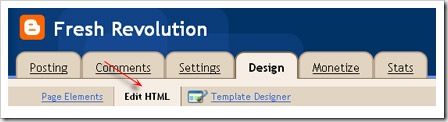
- Do the backup to your full blog template. Click Download Full Template.

- For easier, find the code : <b:skin><


